
- Auto Repair Shop Management Software in Nigeria: The Complete Guide
Running an auto repair workshop involves much more than fixing cars.
Every day, workshop owners and managers have to keep track of customers, vehicles, job cards, technicians, spare parts, appointments, estimates, invoices, payments and dozens of small operational decisions.
For many workshops, these activities are still managed with notebooks, paper job cards, spreadsheets, phone calls and WhatsApp messages.
That may work when a workshop is small. But as the number of customers, technicians and repair jobs increases, keeping everything organized becomes much harder.
This is where auto repair shop management software comes in.
A workshop management system brings the major parts of your business into one place, helping you track what is happening from the moment a customer's vehicle arrives until the repair is completed, paid for and followed up.
For Nigerian workshop owners, the right system can also help create better records, improve accountability, organize parts and labour, and provide a clearer picture of how the business is performing.
In this guide, we'll explain what auto repair shop management software is, what features to look for, the problems it solves, and how to choose a system for your workshop.
What Is Auto Repair Shop Management Software?
Auto repair shop management software is a digital system designed to help mechanics, garage owners and workshop managers run their businesses.
Instead of keeping customer information in one notebook, vehicle information somewhere else, invoices in another file and technician assignments in a WhatsApp group, the information is connected inside one system.
Depending on the software, a workshop management system can help you manage:
Customers
Vehicles
Job cards
Inspections
Repair orders
Technicians
Spare parts
Estimates
Invoices
Payments
Appointments
Service history
Service reminders
Workshop reports
Staff and branches
The goal is not simply to "put your workshop online."
The goal is to make the workshop easier to organize, monitor and grow.
Why Nigerian Auto Repair Workshops Need Management Software
The challenges faced by Nigerian workshops are not always the same as those faced by large international repair chains.
A typical workshop may have customers communicating through WhatsApp, technicians working across several vehicles, spare parts being sourced from different suppliers, payments arriving through transfers or POS, and vehicle records being stored on paper.
As the workshop grows, these disconnected processes can create problems.
1. Lost or incomplete job information
A customer brings in a vehicle and explains the problem.
The mechanic writes a few notes somewhere.
Later, someone needs to know:
What did the customer originally complain about?
What was diagnosed?
Which technician worked on it?
Which parts were replaced?
How much labour was charged?
What did the customer approve?
Has the customer paid?
If the information is scattered across paper and messages, answering those questions becomes difficult.
A digital job card keeps the repair information together.
2. Poor vehicle history
A returning vehicle should not feel like a completely new customer.
A useful vehicle record can show previous visits, repairs, services, parts and other relevant information.
This makes it easier for the workshop to understand what has already happened to the vehicle and gives the customer a more professional experience.
3. Spare-parts problems
Parts are one of the most important areas of workshop operations.
Without proper stock records, it can be difficult to know:
What parts are currently available?
What has been used?
What needs to be reordered?
Which supplier provided a part?
Which repair job consumed a particular part?
How much did the workshop spend on parts?
Inventory management software can connect parts to individual repair jobs and give the workshop a clearer view of stock.
4. Difficulty tracking technicians
When several mechanics are working on different vehicles, the owner needs to know what is happening.
Which technician is assigned to each job?
Which jobs are waiting for parts?
Which vehicles are completed?
Which jobs are taking longer than expected?
A workshop management system can make these activities easier to track.
5. Customers asking for updates
"Is my car ready?"
"How much will it cost?"
"What is wrong with the vehicle?"
"Did you replace the part?"
"How much do I still owe?"
These questions are normal.
The problem occurs when the workshop has no centralized record and staff have to search through messages or ask several people before responding.
Better records make customer communication easier.
What Features Should Auto Repair Shop Management Software Have?Not every workshop needs the same software.
A small independent mechanic may have different requirements from a large multi-branch workshop.
However, there are several core features worth looking for.
1. Customer Management
A workshop should be able to maintain a reliable customer database.
Useful customer information can include:
Name
Phone number
Email
Address
Vehicles owned
Previous repair history
Invoices
Payments
Appointments
Service reminders
The important thing is that the customer record should connect to the vehicles and repair jobs associated with that customer.
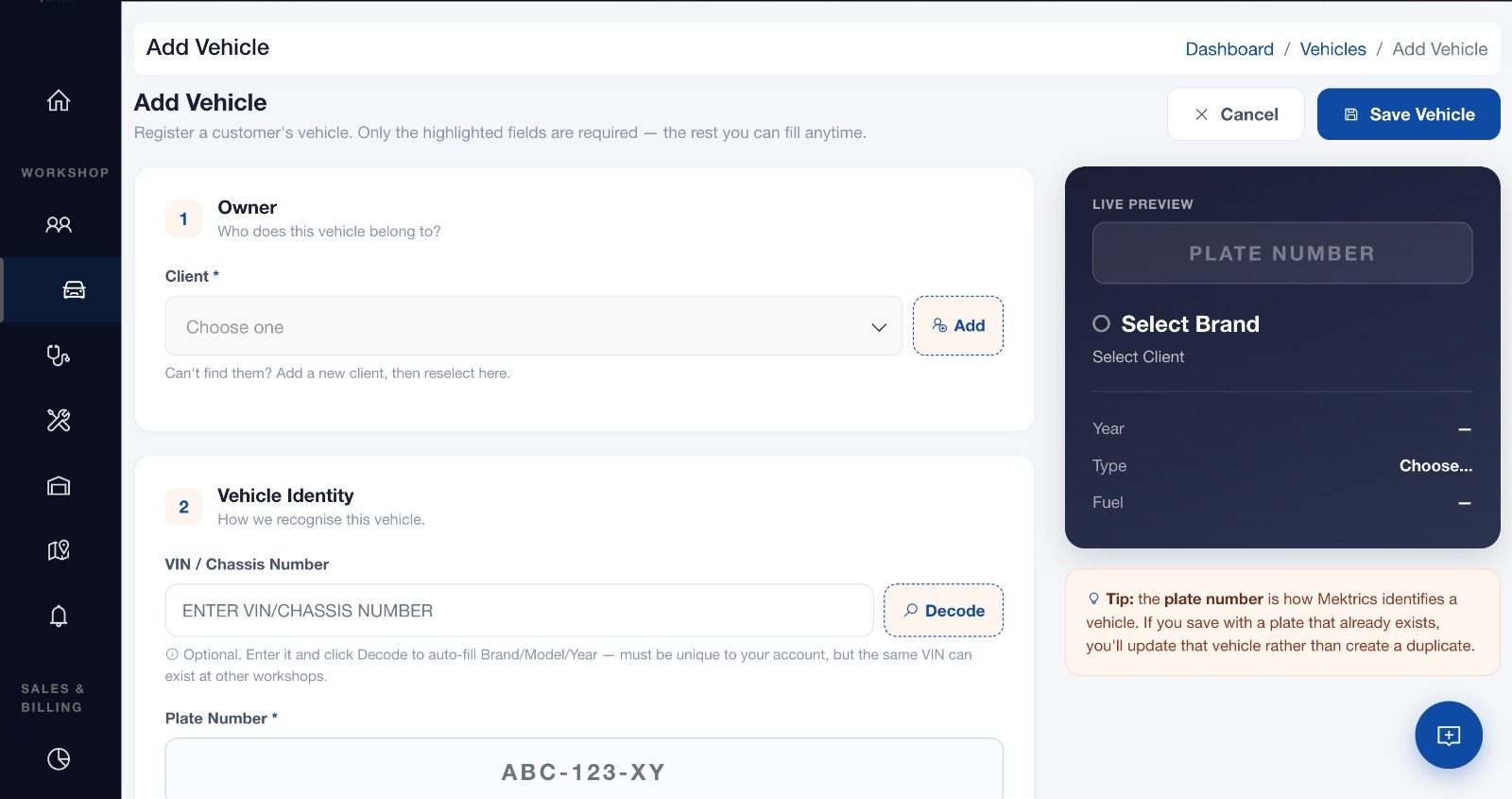
2. Vehicle Management
Vehicle records are at the heart of an auto repair business.
A good system should allow a workshop to record information such as:
Registration number
Make
Model
Year
Mileage
Vehicle identification information
Customer ownership
Repair history
Service history
This creates a digital record that can be referenced whenever the vehicle returns.
3. Digital Job Cards
A job card documents what is happening with a vehicle during a repair.
Instead of relying on a carbon-copy pad, a digital job card can contain:
Customer complaint
Vehicle information
Diagnosis
Assigned technician
Parts
Labour
Job status
Notes
Inspection results
Estimated cost
Final invoice
This makes it easier to follow a vehicle through the workshop.
For many workshops, moving from paper job cards to digital job cards can be one of the simplest ways to improve operational visibility.
4. Inspections and Diagnostics
Before carrying out major repairs, technicians may need to inspect the vehicle and document their findings.
Workshop software can allow technicians to record inspection results and attach relevant notes or evidence.
This can help the service advisor explain findings to customers before additional work is performed.
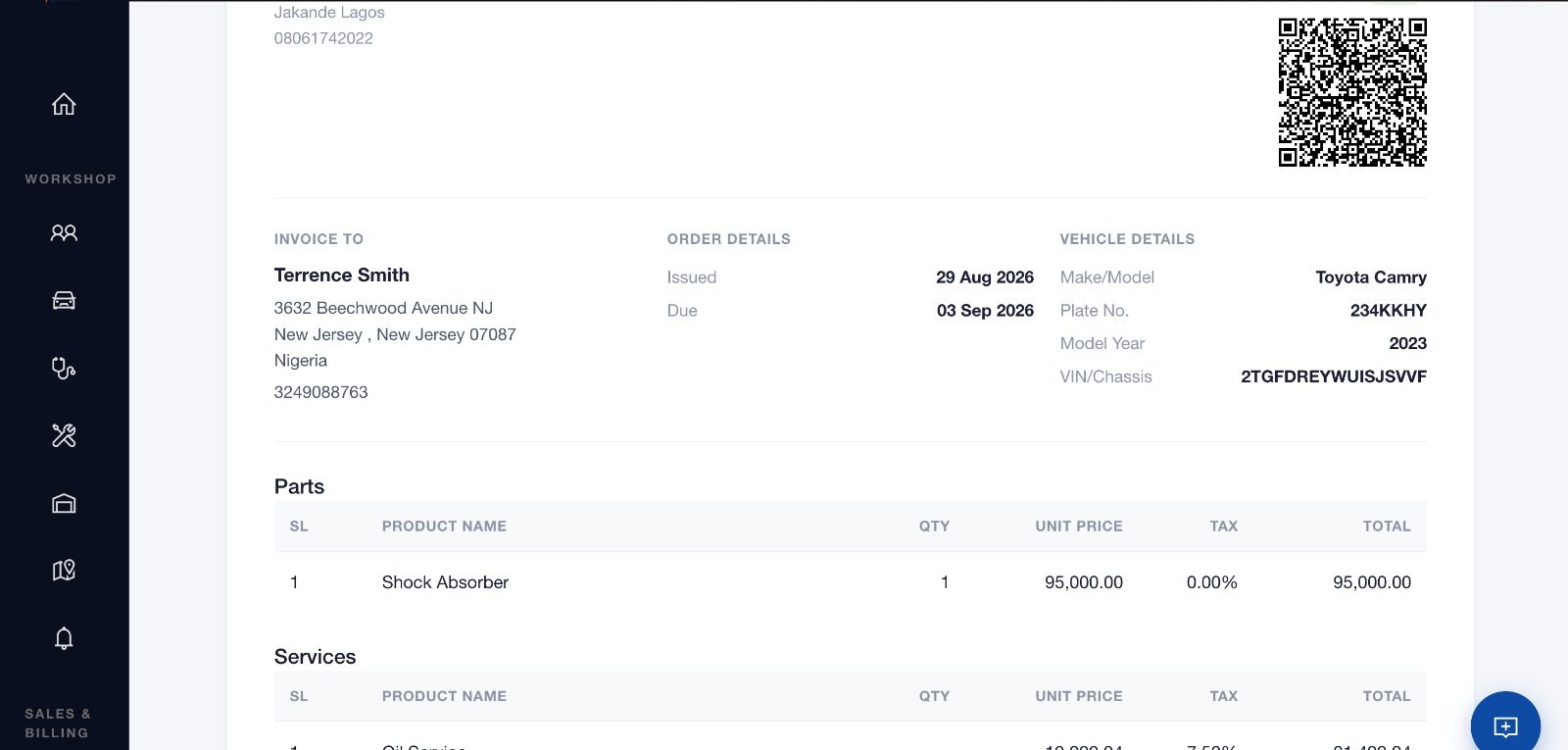
5. Estimates
An estimate gives the customer an understanding of the expected cost before work begins.
A good estimate system should make it possible to list:
Parts
Labour
Services
Quantities
Prices
Discounts
Taxes where applicable
Estimated total
The estimate can then be converted into the relevant repair or invoice workflow.
6. Parts and Inventory Management
A workshop management system should make it easier to understand what is happening with spare parts.
Important capabilities can include:
Parts catalogue
Stock quantities
Parts used on jobs
Supplier records
Purchase records
Reorder information
Parts pricing
Stock movement
The closer inventory is connected to repair jobs, the easier it becomes to understand the true cost of each job.
7. Technician Management
Workshop software can also help managers organize their technicians.
Depending on the system, this may include:
Technician profiles
Job assignment
Workload
Job status
Attendance
Performance information
Commissions
Labour tracking
The objective is not simply to monitor employees.
It is to give the workshop a clearer picture of how work is moving through the business.
8. Invoicing and Payments
Once a repair is completed, the workshop needs to bill the customer.
A digital invoicing system can combine parts and labour into an itemized invoice.
It can also keep track of:
Amount invoiced
Amount paid
Outstanding balance
Payment history
Payment method
Receipts
This becomes especially useful as the number of customers increases.
9. Appointments
A workshop can lose business when appointments are poorly organized.
Appointment management can help the workshop keep track of:
Customer bookings
Vehicle
Requested service
Date and time
Assigned staff
Appointment status
It can also make it easier to plan workshop capacity.
10. Service Reminders
A completed repair should not necessarily be the end of the customer relationship.
Depending on the vehicle and service performed, the workshop may want to remind the customer about future maintenance.
Examples include:
Oil changes
Routine servicing
Brake inspections
Tyre checks
Other scheduled maintenance
Service reminders can turn one repair visit into an ongoing customer relationship.
How Does Workshop Management Software Improve a Repair Business?The value of software is not the software itself.
The value comes from what it helps the business accomplish.
Better organization
Instead of having information spread across notebooks, spreadsheets and chat messages, important workshop information can be kept in one place.
Better customer communication
Staff can access the customer's vehicle and repair information without repeatedly asking the technician or searching through old messages.
Better accountability
Digital records create a clearer history of what happened during a repair.
Better inventory control
Parts can be associated with jobs, helping the workshop understand where inventory is going.
Better financial visibility
Invoices, payments, expenses and job information can give owners a clearer picture of the business.
Better customer retention
Vehicle histories and service reminders make it easier to stay connected with customers after a repair.
Better decision-making
Instead of relying entirely on intuition, workshop owners can use business data to understand what is happening.
What Should a Nigerian Workshop Look for When Choosing Software?There are many workshop-management products available internationally and an increasing number designed specifically for African markets.
Current Nigerian/African products emphasize features such as job cards, inspections, vehicle history, inventory, invoicing, technician management and workshop profitability.
But features alone should not determine your decision.
Here are some important questions to ask.
Is it suitable for your workshop size?
A one-bay workshop does not necessarily need the same system as a 20-bay operation.
Look for software that allows you to start with the functionality you actually need and expand as your business grows.
Does it work well on mobile devices?
Mechanics spend their time around vehicles, not behind office desks.
A system that requires everyone to sit at a computer may be difficult to adopt.
Mobile accessibility can make a major difference.
Can it handle your workflow?
Before choosing software, map out how your workshop actually operates.
For example:
Customer arrives → Vehicle is registered → Inspection → Estimate → Customer approval → Repair → Parts used → Quality check → Invoice → Payment → Vehicle delivered → Follow-up
The software should support this workflow rather than forcing your business into an unrelated process.
Can your staff actually use it?
A sophisticated system is not useful if your team refuses to use it.
Look for:
Simple navigation
Clear workflows
Mobile accessibility
Appropriate user permissions
Easy onboarding
Useful support
Can it grow with your business?
If you plan to expand, consider whether the system can support:
More customers
More vehicles
More staff
More technicians
More branches
More operational data
Changing systems every time your workshop grows can create unnecessary disruption.
How Much Does Auto Repair Shop Management Software Cost In Nigeria ?There is no single price for workshop management software.
Pricing can depend on:
Number of users
Number of vehicles
Number of branches
Features
Inventory requirements
Payroll
Reporting
Customer portals
Mobile functionality
Support
Customization
Some systems use monthly subscriptions. Others may charge for implementation, customization or additional modules.
The cheapest option is not automatically the most cost-effective.
A better question is:
How much value will the software create compared with what the workshop is currently losing through inefficient processes?
For example, consider the cost of:
Lost repair records
Unpaid invoices
Missed appointments
Untracked parts
Repeated administrative work
Poor customer follow-up
Technician downtime
Manual reporting
If software reduces several of these problems, its value can be greater than its subscription price.
Should a Small Mechanic Workshop Use Software?Yes, but the software should match the workshop's needs.
A small workshop may not need a complex enterprise system.
However, even a small workshop can benefit from keeping digital records of:
Customers
Vehicles
Job cards
Repairs
Parts
Invoices
Payments
Service history
Starting with organized digital records can also make future growth easier.
Instead of waiting until the workshop becomes large and complicated, the owner can establish better processes early.
What About Workshops That Currently Use WhatsApp?WhatsApp is extremely useful for communication.
Many workshops use it to:
Send estimates
Discuss repairs
Share vehicle photos
Update customers
Confirm approvals
Send invoices
The problem is not WhatsApp itself.
The problem is using WhatsApp as the entire workshop management system.
A message can be buried.
A photo can be difficult to find months later.
A technician may know something that the front desk does not.
A customer conversation may contain information that never gets recorded in the vehicle's history.
The better approach is to use communication tools for communication while keeping the actual operational record inside the workshop management system.
Why Vehicle History MattersImagine a customer brings the same vehicle to your workshop six months after its previous service.
Without a digital history, your team may need to ask:
"What did we do to this car last time?"
With a proper vehicle record, the answer can be available immediately.
You can see previous visits, repairs and service information.
This can help the workshop:
Diagnose recurring problems
Avoid unnecessary duplication
Understand previous work
Recommend appropriate maintenance
Provide better customer service
It also gives the workshop something valuable beyond today's transaction:
a long-term relationship with the vehicle.
Why Job Cards Matter So MuchThe job card is effectively the operational record of a repair.
It connects the customer's complaint to the vehicle, diagnosis, technician, parts, labour and final billing.
A well-managed job card can answer:
What came in?
What did we find?
What did the customer approve?
Who worked on it?
What parts were used?
What did the work cost?
What was the customer charged?
What happened when the vehicle left?
When this information is captured digitally, it becomes much more useful than a piece of paper stored in a drawer.
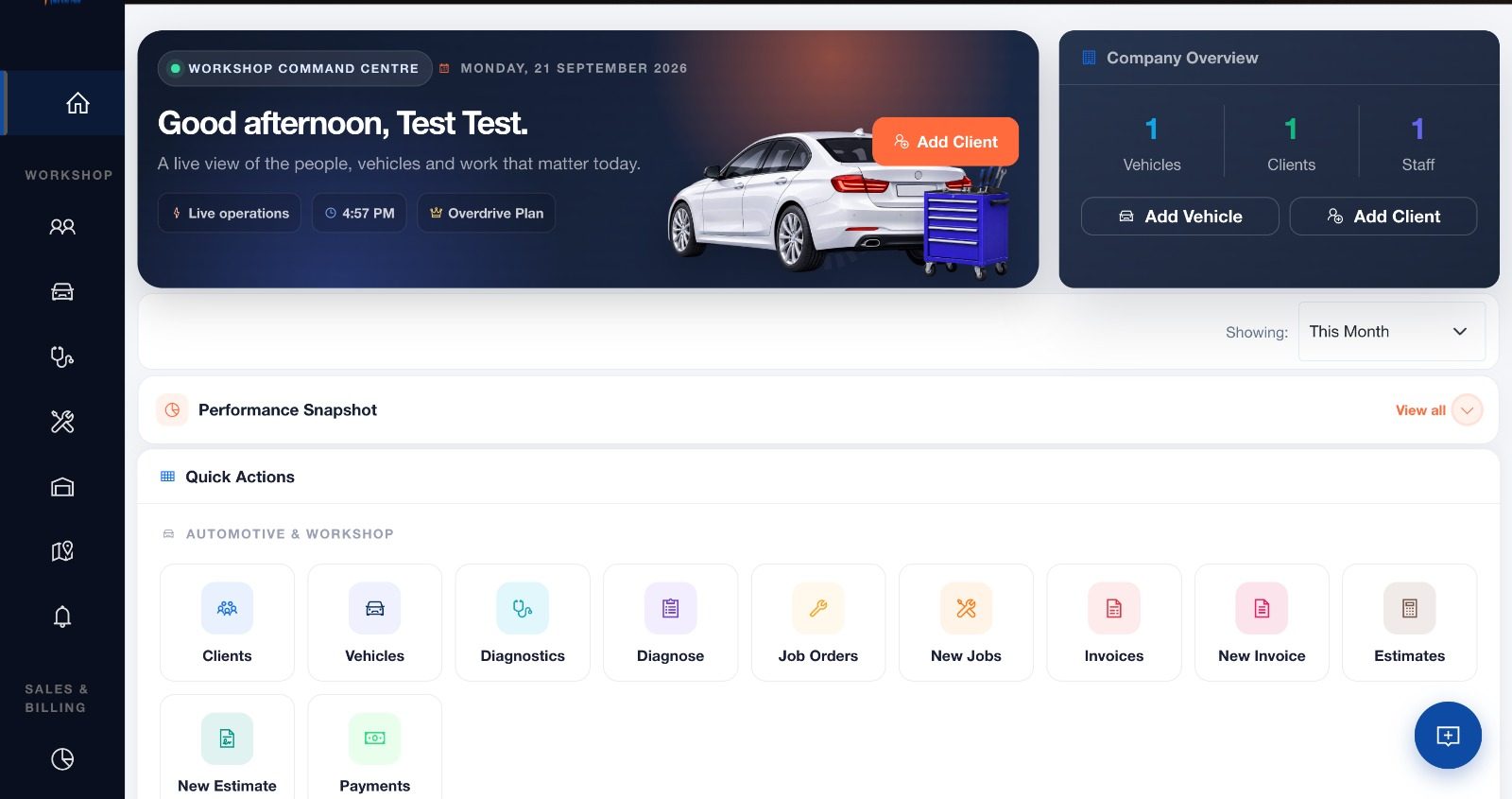
How Mektrics Helps Workshops Go DigitalMektrics is designed around the different stages involved in operating an auto repair business.
Instead of treating customer management, vehicles, repair jobs, inventory, technicians, billing and customer follow-up as completely separate activities, Mektrics brings them together into one workshop-management environment.
Depending on the plan and workflow, Mektrics provides tools covering areas such as:
Customer and vehicle management
Job orders
Inspections and diagnostics
Estimates
Invoicing
Payments
Parts and inventory
Technician and staff management
Appointments
Service reminders
Workshop operations
Customer-facing tools
Reporting
Multi-branch operations
This means a workshop can build a connected workflow around the vehicle rather than managing every stage separately.
For an independent Nigerian workshop, that can mean replacing a collection of disconnected processes with one structured system.
Explore Mektrics to see how it can fit your workshop's workflow.
How to Transition From Paper to Digital Workshop ManagementMoving from paper to software does not have to happen overnight.
A practical transition can look like this.
Step 1: Identify your current processes
Write down how your workshop currently handles:
New customers
Vehicle intake
Job cards
Inspections
Estimates
Parts
Technician assignments
Invoices
Payments
Follow-ups
Step 2: Decide what needs to be digitized first
You do not necessarily need to digitize everything on day one.
Customer records, vehicle history, job cards and invoices are often good starting points.
Step 3: Train your team
Explain not just how to use the software but why the workshop is changing its process.
Technicians, service advisors, cashiers and managers may interact with the system differently.
Step 4: Establish one source of truth
Once you begin using the system, avoid creating parallel records everywhere.
If a job is managed in the system, the important job information should stay there.
Step 5: Review the results
After several weeks, look at what has improved.
Are jobs easier to track?
Are invoices easier to find?
Are customers receiving better updates?
Are parts easier to monitor?
Are you getting better visibility into workshop performance?
Digital transformation should ultimately make the workshop easier to run.
Common Mistakes to Avoid When Choosing Workshop SoftwareChoosing based only on price
A cheap system that your team does not use can be more expensive than a system that genuinely improves operations.
Buying too many features
More features do not automatically mean better software.
Choose functionality that solves actual problems in your workshop.
Ignoring mobile usability
Your technicians should be able to interact with the system without disrupting their work.
Forgetting data ownership and access
Understand how your business data is stored, accessed and exported.
Not considering growth
If you expect to add staff or branches, make sure the system can support that growth.
Making the software the manager's tool only
The software should be useful to the people actually doing the work.
If technicians cannot update jobs easily, the owner may still end up relying on WhatsApp and paper.
Frequently Asked QuestionsWhat is the best auto repair shop management software in Nigeria?
The right choice depends on the size of your workshop, workflow, budget and required features. Compare systems based on job management, customer and vehicle records, inventory, invoicing, technician management, reporting, usability and support rather than choosing solely on price.
What is workshop management software?
Workshop management software is a digital platform that helps an auto repair business manage customers, vehicles, repair jobs, technicians, parts, estimates, invoices, payments and other workshop operations.
Can a small mechanic workshop use management software?
Yes. Small workshops can use software to organize customer records, vehicle history, job cards, invoices, payments and other core processes without needing a large enterprise system.
Can workshop software replace paper job cards?
Yes. Digital job cards can capture the same core information as paper job cards while making the records easier to search, update and connect to other workshop processes.
Can workshop management software track spare parts?
Many systems provide inventory features that allow workshops to record parts, stock levels, purchases and parts used on repair jobs.
Can workshop software track vehicle service history?
Yes. Vehicle-management functionality can connect previous repair and service records to the vehicle, allowing the workshop to reference its history when the vehicle returns.
Does a workshop need software if it already uses WhatsApp?
WhatsApp can remain useful for customer communication, but it should not necessarily be the only place where operational information is stored. A workshop management system provides structured records for jobs, vehicles, parts, invoices and payments.
Is workshop management software useful for multiple branches?
Yes. Multi-branch functionality can help businesses manage customers, vehicles, staff, inventory and operations across different locations while maintaining centralized visibility.
Final ThoughtsRunning a modern auto repair workshop requires more than technical skill.
A workshop can have excellent mechanics and still struggle if its jobs, customers, inventory, payments and records are poorly organized.
Auto repair shop management software gives workshop owners a way to bring those processes together.
For Nigerian workshops, the most useful system is one that understands the realities of the business: mobile technicians, customer communication, spare-parts management, vehicle histories, job cards, payments and the need to grow without losing control.
Whether you run a small mechanic workshop, an independent auto repair business or a growing multi-branch operation, the goal should be the same:
Know what is happening in your workshop, know where your money is going, and give every customer and vehicle a professional experience.
Mektrics provides the tools to help you make that transition from disconnected workshop processes to a more organized digital operation.
Ready to take your workshop beyond paper and scattered records? Explore Mektrics and see how digital workshop management can work for your business.
Auto Repair Shop Management Software In Nigeria: The Complete Guide
September 22, 2026 · By Mektrics Team

0 Comments